ScientiaMobile WURFL.js Business Edition Getting Started Guide
==============================================================
Introduction
------------
WURFL.js provides access to ScientiaMobile's cloud-based WURFL Device
Description Repository (DDR). With a single JavaScript snippet, developers can detect a
device and its capabilities in order to better control, optimize, and track the success
of their website.
Quick Start
-----------
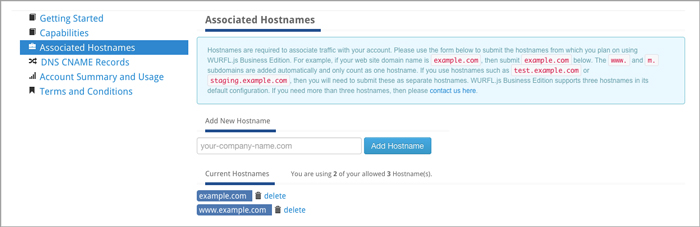
To begin, you will simply need to enter the hostnames of the websites from
which you intend to use WURFL.js:
If you do not want to configure a CNAME record for your account, then you can now include the
following script referencing `wjs.wurflcloud.com/wurfl.js` in your markup:
**For the best detection experience, we recommend loading WURFL.js via the async method, as detailed in the `Async loading` section below.**
The `WURFL` object is now available to use:
/**
* Example of pushing WURFL capabilities to google analytics
*/
ga('send', 'pageview', {
'dimension1': WURFL.complete_device_name,
'dimension2': WURFL.form_factor,
'dimension3': WURFL.is_mobile,
'dimension4': WURFL.is_robot
});
*Async loading*
WURFL.js dispatches an event called `WurflJSDetectionComplete` to the `document` node when it's finished. This allows you to include it in `async` mode and avoid DOM-blocking content. We *do not recommend* that the script tag be placed in the document's head element.
In Javascript you can listen for the event:
document.addEventListener("WurflJSDetectionComplete", function(){
console.log("WURFL.js is finished:")
console.log(window.WURFL)
});
Please note that the event listener must be defined **before** the WURFL.js script tag is included to avoid a race condition.
For example, the Google Analytics code in the previous example could be fired only after WURFL.js is finished:
document.addEventListener("WurflJSDetectionComplete", function(){
ga('send', 'pageview', {
'dimension1': WURFL.complete_device_name,
'dimension2': WURFL.form_factor,
'dimension3': WURFL.is_mobile,
'dimension4': WURFL.is_robot
})
})
*Execution time limit*
For certain devices WURFL.js will run a number of tests to identify the device. The tests are usually fast and accurate.
However, if you want WURFL.js to spend more time to make the results even more reliable, you can allow more execution time.
This is done by appending "?time_limit=" to the script reference.
The below example will allow WURFL.js to execute for up to one second:
*Content Security Policy*
If your website uses a Content-Security-Policy (CSP), you will need to add exemptions for WURFL.js for the `script-src` and the `connect-src` directives like so:
Content-Security-Policy: script-src https://wjs.wurflcloud.com; connect-src https://wjs.wurflcloud.com
If you use a WURFL.js custom domain/CNAME, you should use that domain as the source in the CSP instead. For example if your WURFL.js custom domain is `wurfljs.foo.com`, then your CSP should look like this:
Content-Security-Policy: script-src https://wurfljs.foo.com; connect-src https://wurfljs.foo.com
Consideration for User-Agent Client Hints for WURFL.js Business Edition
-----------
As part of the [User-Agent reduction/freeze](https://www.chromium.org/updates/ua-reduction/), User-Agents from Chrome on desktop and Android platforms no longer contain information accurate enough to be solely used for device detection. As a result, we encourage you to implement and start requesting User-Agent Client Hints from your clients. We also recommend that you delegate these Client Hints to WURFLjs for the best detection experience.
Please note that User-Agent Client Hints are only available in a secure context (`https`).
In order to opt in to receive User-Agent Client Hints, you will need to set your server's response headers to advertise support for them using the `Accept-CH` header. Here's an example:
Accept-CH: sec-ch-ua-platform-version,sec-ch-ua-full-version,sec-ch-ua-full-version-list,sec-ch-ua-model,sec-ch-ua-arch,sec-ch-ua-bitness,sec-ch-ua-wow64
Next, you will want to delegate these Client Hints to WURFLjs so that they can be used as a part of the detection process. This can be achieved by setting a permissions-policy header:
permissions-policy: ch-ua-platform-version=(self "https://wjs.wurflcloud.com"),ch-ua-full-version=(self "https://wjs.wurflcloud.com"),ch-ua-full-version-list=(self "https://wjs.wurflcloud.com"),ch-ua-model=(self "https://wjs.wurflcloud.com"),ch-ua-arch=(self "https://wjs.wurflcloud.com"),ch-ua-bitness=(self "https://wjs.wurflcloud.com"),ch-ua-wow64=(self "https://wjs.wurflcloud.com")
If you are using a platform/CMS that restricts your ability to set server response headers, it may be easier to use the `delegate-ch` meta tag instead. Using this meta tag, you can request User-Agent Client Hints on WURFL.js's behalf and delegate them in one go:
Additional information on adding support for User-Agent Client Hints are available in our guide [here](https://docs.scientiamobile.com/guides/implementing-useragent-clienthints).
*Accessing a User-Agent Client Hints enriched result*
As mentioned in the `Quick Start` section above, we recommend loading WURFL.js asynchronously and listening to the `WurflJSDetectionComplete` event, which is generated once the device detection process is complete. Depending on the complexity of the environment and the method in which WURFL.js receives the User-Agent Client Hint data, this process can take some time to complete. As a result, if you desire intermediate device detection information while you wait for the full device detection process to complete, you can listen to the `WurflJSInitComplete` event.
The `WurflJSInitComplete` event is generated with the information that is readily available and provides reasonable defaults until WURFL.js is able to consolidate device information from various sources and generate the `WurflJSDetectionComplete` event.
document.addEventListener("WurflJSInitComplete", function(){
console.log("WURFL.js is initialized and can provide intermediate device information:")
console.log(window.WURFL)
});
Just as with the `WurflJSDetectionComplete` event, the event listener for the `WurflJSInitComplete` event must be defined **before** the WURFL.js script tag is included.
Caching
-------
WURFL.js Basic, Standard, and Pro allows clients to cache the WURFL response on the end-user's browser in order
to increase overall performance.
When testing, it is possible to disable caching by adding `debug=true` to the query string.
Hostnames
---------
Hostnames are required to associate traffic with your account. In the
**Associated hostnames** section of your account, enter the domains
and subdomains from which you will be accessing WURFL.js.
The `www.` and `m.` subdomains are added automatically and count as a single
hostname. Other subdomains, such as `test.example.com` or `staging.example.com`,
must be added separately.
By default, WURFL.js Basic, Standard, and Pro plans include 3 hostnames. If you
need more, [contact us](https://scientiamobile.com/general-inquiry/).
DNS CNAME Support
-----------------
You can name the WURFL.js Basic, Standard, or Pro service as your own by configuring your Domain
Name Server (DNS) using CNAME records.
To set up a CNAME record, configure a CNAME record that points to `wjs.wurflcloud.com` with your
DNS provider, which may or may not be the same as your web hosting provider. Then contact your ScientiaMobile sales manager to have the CNAME record
associated with your account. If you don't know who your sales manager is, use our
[contact form](https://scientiamobile.com/general-inquiry/).
> **Note:** Your DNS changes may take up to a full day to propagate.
You will be able to refer to the service in the HTML page as (assuming your CNAME entry
is `wjs.your-domain.com`):
HTTPS and SSL Support
---------------------
HTTPS provides a level of security and trust for users of many commercial services. WURFL.js
Basic, Standard, or Pro can serve your CNAME hostnames over HTTPS using your own SSL certificates.
To set up SSL certificates for your account, contact your ScientiaMobile sales manager. If you
don't know who your sales manager is, use our [contact form](https://scientiamobile.com/general-inquiry/).
Service Level Agreement (SLA)
-----------------------------
WURFL.js Basic/Standard/Pro provides fully dedicated infrastructure for its customers and a Service Level Agreement with a 99.99% uptime target. The definition
of the SLA can be found in the license agreement
[here](https://scientiamobile.com/terms-and-conditions-privacy-licenses).
License
-------
2026 ScientiaMobile Incorporated.
The complete WURFL.js Basic/Standard/Pro License can be found [here](https://scientiamobile.com/terms-and-conditions-privacy-licenses).